-
![]()
Daisy
Daisy is the Senior editor of the writing team for EaseUS. She has been working in EaseUS for over ten years, starting from a technical writer to a team leader of the content group. As a professional author for over 10 years, she writes a lot to help people overcome their tech troubles.…Read full bio -
Jane is an experienced editor for EaseUS focused on tech blog writing. Familiar with all kinds of video editing and screen recording software on the market, she specializes in composing posts about recording and editing videos. All the topics she chooses …Read full bio
-
![]()
Alin
Alin is an experienced technical blog writing editor. She knows the information about screen recording software on the market, and is also familiar with data cloning and data backup software. She is expert in writing posts about these products, aiming at providing users with effective solutions.…Read full bio -
Jean is recognized as one of the most professional writers in EaseUS. She has kept improving her writing skills over the past 10 years and helped millions of her readers solve their tech problems on PC, Mac, and iOS devices.…Read full bio
-
![]()
Jerry
Jerry is a fan of science and technology, aiming to make readers' tech life easy and enjoyable. He loves exploring new technologies and writing technical how-to tips. All the topics he chooses aim to offer users more instructive information.…Read full bio -
![]()
Rel
Rel has always maintained a strong curiosity about the computer field and is committed to the research of the most efficient and practical computer problem solutions.…Read full bio -
![]()
Gemma
Gemma is member of EaseUS team and has been committed to creating valuable content in fields about file recovery, partition management, and data backup etc. for many years. She loves to help users solve various types of computer related issues.…Read full bio
Page Table of Contents

Jean
Updated on Oct 30, 2026
0 Views |
0 min read
No, Hinge does not currently notify someone when you take a screenshot. However, Hinge changed its screenshot policy in September 2026. In some regions, Hinge now blocks screenshots and screen recordings of other people's profiles instead of simply notifying them.
This means the answer depends on what you're trying to capture and where you use Hinge. Here's what you need to know about Hinge screenshots and screen recording.
Does Hinge Notify You When Someone Takes a Screenshot?
Hinge doesn't currently notify you when someone screenshots your profile.
But an official Hinge document notes an important update: in some regions, Hinge has introduced Screenshot Blocking. When you're viewing certain pages containing another person's profile or photos, Hinge may prevent the screenshot or screen recording from being captured in the first place.
So, there is a difference between screenshot notifications and screenshot blocking:
|
Action |
What happens |
|
Screenshot another person's profile |
Blocked in supported regions |
|
Screen record another person's profile |
Blocked in supported regions |
|
Screenshot a Hinge chat you're part of |
Allowed |
|
Screenshot your own profile |
Allowed |
Hinge first introduced Screenshot Protection in India in 2026 and now offers screenshot blocking in select regions.
Can You Screenshot Hinge Profiles in 2026?
Not always. Hinge currently blocks screenshots and screen recordings on these pages in supported regions:
- Discover
- Standouts
- Likes You
- Someone else's profile
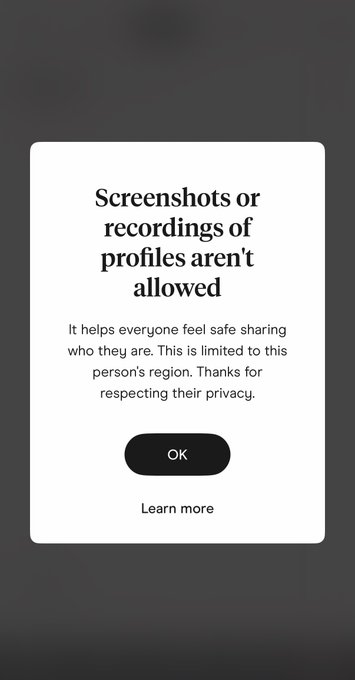
If you try to capture a protected screen, the page goes dark, and Hinge displays a short message explaining why the capture was blocked. Hinge also hides protected content from the app switcher if you switch to another app while viewing it.
However, Hinge hasn't blocked screenshots everywhere or in every part of the app.
Why Is Hinge Blocking Screenshots?
The main reason is privacy.
A Hinge profile can contain someone's photos and other personal information. Once another person screenshots that profile, the content can be saved or shared outside Hinge without the original user's knowledge.
Hinge says screenshot blocking is intended to reduce this kind of sharing and give daters more confidence when putting themselves out there.
The change is also part of Hinge's broader focus on dating safety. In September 2026, Hinge announced Screenshot Protection as part of a new safety-focused experience in India, alongside features such as Face Check and a Block List.
In other words, Hinge isn't simply trying to stop people from taking screenshots. The goal is to make it harder to copy and share another dater's profile without their knowledge or consent.
Is Hinge Screenshot Blocking Available Everywhere?
No. Hinge currently describes Screenshot Blocking as being available in select regions.
Hinge first announced the feature as part of its updated experience in India on September 28, 2026. The company said Screenshot Protection would block screenshots of profiles shown in Discover, Likes You, and Standouts, while still allowing screenshots of conversations.
Hinge's current Help Center uses the broader wording "select regions," so it is better not to assume that the same screenshot rules apply to every Hinge user.
If screenshots work normally on your account, that does not necessarily mean Hinge has no screenshot protection. The feature may simply not be available in your region or on that particular page.
What Happens When You Try to Screenshot a Hinge Profile?
If you are in a region where the feature is enabled, you may see the following:
- Open Discover, Standouts, Likes You, or another person's profile.
- Try taking a screenshot or starting a screen recording.
- Hinge blocks the capture.
- The page goes dark and shows a short explanation.
- If you switch to another app, the app switcher also hides the protected content.
This differs from an app taking a screenshot and then notifying the other person. Hinge's current approach is to prevent the capture on supported screens.
Hinge Screenshot FAQ
1. Does Hinge notify someone if you screenshot their profile?
No. Hinge does not currently describe screenshot notifications as part of its screenshot policy. In supported regions, it instead blocks screenshots of certain profile pages.
2. Does Hinge block screen recording?
Yes, but only on certain pages and in supported regions. Hinge currently lists Discover, Standouts, Likes You, and other people's profiles as protected areas.
3. Does Hinge screenshot blocking work everywhere?
No. Hinge currently says Screenshot Blocking is available in select regions, so the experience can vary depending on where you use Hinge.
4. Can you screenshot Hinge chats?
Yes. Hinge still allows you to screenshot chats you're part of. This is an important exception because screenshots can be useful when you need to report inappropriate or uncomfortable behavior. Hinge specifically says chat screenshots remain available for this reason.
5. Can you screenshot your own Hinge profile?
Yes. Your own profile is also exempt from the screenshot block. Hinge says your information is yours to save or share.
6. Does Hinge Notify Screen Recording?
Hinge's current policy focuses on blocking screen recording, rather than notifying the other person that you tried to record their profile. In supported regions, Hinge blocks screen recording on the same protected pages, including Discover, Standouts, Likes You, and other people's profiles. So if you're wondering whether someone will receive a "this person recorded your profile" alert, that's not how Hinge currently describes the feature.
7. Does Hinge Screenshot Blocking Completely Protect Profiles?
Not completely. Screenshot blocking can make it much harder to save a profile using the normal screenshot or screen-recording functions on your phone, but it cannot prevent every possible way of copying something from a screen. For example, someone could potentially use another device to photograph the screen. That's why screenshot blocking is best understood as an additional privacy layer, rather than a guarantee that profile content can never be copied.
The Bottom Line
Hinge does not currently notify users when someone takes a screenshot. But as of 2026, that's no longer the whole story.
In select regions, Hinge now blocks screenshots and screen recordings of other people's profiles on pages such as Discover, Standouts, and Likes You. Screenshots of your own profile and chats you're part of are still allowed.
So if you're using Hinge today, don't rely on older articles that simply say "Hinge doesn't notify screenshots." The more important question now is whether Hinge allows the screenshot at all.