-
![]()
Daisy
Daisy is the Senior editor of the writing team for EaseUS. She has been working in EaseUS for over ten years, starting from a technical writer to a team leader of the content group. As a professional author for over 10 years, she writes a lot to help people overcome their tech troubles.…Read full bio -
Jane is an experienced editor for EaseUS focused on tech blog writing. Familiar with all kinds of video editing and screen recording software on the market, she specializes in composing posts about recording and editing videos. All the topics she chooses …Read full bio
-
![]()
Alin
Alin is an experienced technical blog writing editor. She knows the information about screen recording software on the market, and is also familiar with data cloning and data backup software. She is expert in writing posts about these products, aiming at providing users with effective solutions.…Read full bio -
Jean is recognized as one of the most professional writers in EaseUS. She has kept improving her writing skills over the past 10 years and helped millions of her readers solve their tech problems on PC, Mac, and iOS devices.…Read full bio
-
![]()
Jerry
Jerry is a fan of science and technology, aiming to make readers' tech life easy and enjoyable. He loves exploring new technologies and writing technical how-to tips. All the topics he chooses aim to offer users more instructive information.…Read full bio -
![]()
Rel
Rel has always maintained a strong curiosity about the computer field and is committed to the research of the most efficient and practical computer problem solutions.…Read full bio -
![]()
Gemma
Gemma is member of EaseUS team and has been committed to creating valuable content in fields about file recovery, partition management, and data backup etc. for many years. She loves to help users solve various types of computer related issues.…Read full bio
Page Table of Contents

Jean
Updated on Aug 28, 2026
0 Views |
0 min read
Choosing between Bandicam vs OBS Studio is a common struggle for anyone starting screen recording, whether for gaming, tutorials, or content creation. Both tools are popular, but they serve very different needs: one focuses on simplicity and performance, while the other offers advanced control and streaming features.
This comparison arises because users often feel overwhelmed and unsure which tool best fits their skill level, system performance, and recording goals.
Bandicam vs OBS: Quick Comparison Table
If you just want a fast, side-by-side overview, this table highlights the key differences that matter most in real use of Bandicam vs OBS, from performance and ease of use to features and platform support.
|
Category |
Bandicam |
OBS Studio |
|
Best For |
Beginners, quick recording, low-end PCs |
Streaming, content creation, advanced users |
|
Ease of Use |
Very easy, minimal setup |
Steeper learning curve, requires setup |
|
Performance |
Lightweight, stable for recording |
Resource-heavy if not optimized |
|
Recording Features |
Strong for screen & gameplay recording |
Flexible, supports multi-source recording |
|
Streaming |
❌ |
✅ Built-in (Twitch, YouTube, etc.) |
|
Customization |
Limited |
Very high (plugins, settings, scenes) |
|
User Interface |
Clean and simple |
Complex, panel-based |
|
Pricing |
Freemium (watermark & limits in free version) |
Completely free and open-source |
|
OS Compatibility |
Windows, Mac, web-based |
Windows, macOS, Linux |
|
File Formats |
MP4, AVI, MKV, WebM, MP3 |
MP4, AVI, MKV, WebM, MP3, FLV, and more |
Share this post if you find it helpful!

Bandicam or OBS Studio: What's the Real Difference?
1. User Interface
In short, Bandicam offers a cleaner and more user-friendly interface for quick tasks, while OBS Studio provides a more complex but powerful workspace designed for advanced control.
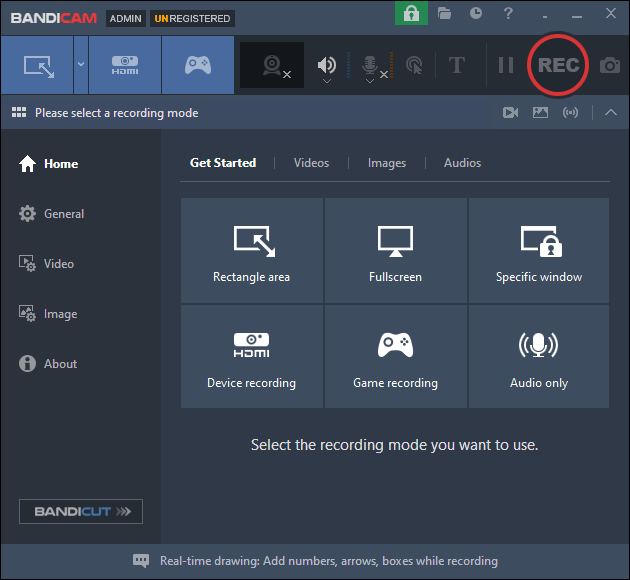
- Bandicam's interface is clean and minimal. The main window focuses on just a few key actions: selecting a recording mode, adjusting basic settings, and starting or stopping a recording. Everything is clearly labeled, and most features are accessible within one or two clicks. This makes the experience feel intuitive, even for first-time users, and reduces the chance of getting lost in the interface.
- OBS Studio, on the other hand, uses a more complex, panel-based layout. You'll see multiple sections at once—Scenes, Sources, Audio Mixer, Controls—which are all essential to how the software works. While this layout gives you a lot of flexibility, it can feel crowded and technical at first. New users often aren't sure where to click or what each panel does without prior knowledge.
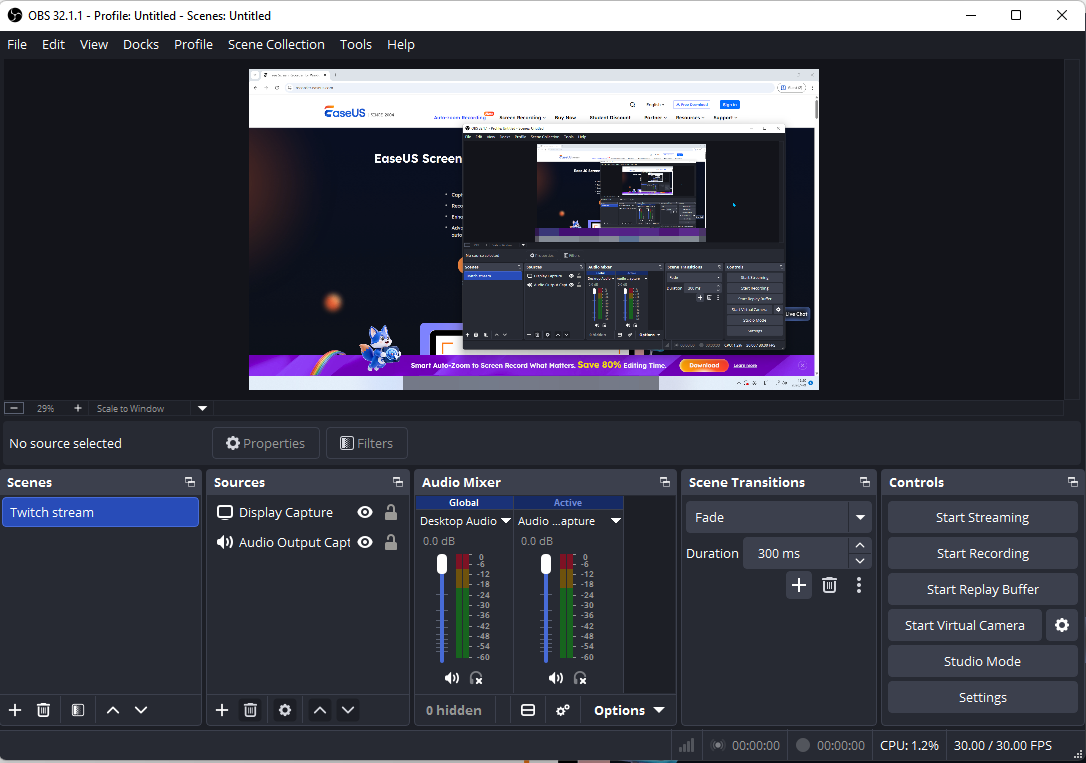
Over time, experienced users may come to appreciate OBS's interface for its precise control over every element of a recording or stream. But for beginners, that same flexibility often translates into confusion and a steeper learning curve.
2. Key Features
In short, Bandicam prioritizes simplicity and efficiency, while OBS Studio offers a much broader, more powerful feature set for users who need advanced control.
Bandicam and OBS Studio differ most in how much control they offer versus how quickly you can start recording. Bandicam is built for fast, efficient capture, while OBS is designed for more complex, production-level setups.
|
Feature |
Bandicam |
OBS Studio |
|
Screen Recording |
✅ |
✅ |
|
Game Recording |
✅ (optimized) |
✅ |
|
Live Streaming |
❌ |
✅ |
|
Multi-Source Scenes |
❌ |
✅ |
|
Audio Mixing |
Basic |
Advanced |
|
Plugins |
❌ |
✅ |
|
Built-in Tools |
Basic |
❌ |
|
Virtual Camera |
❌ |
✅ |
|
Schedule recording |
✅ |
❌ |
|
Drawing tool |
✅ |
❌ |
|
Auto start/stop recording |
✅ |
❌ |
1). Recording Capabilities
Both tools cover the basics well: you can record your screen, gameplay, webcam, and audio without much trouble. However, the way they handle recording is quite different.
- Bandicam is optimized for straightforward capture, especially for gameplay using DirectX/OpenGL. It's designed to be stable and efficient, making it a solid choice if your goal is simply to record without tweaking too many settings.
- OBS Studio, on the other hand, treats recording as part of a broader workflow. Instead of just capturing a screen, it lets you build scenes with multiple sources, such as webcam, overlays, and audio inputs, before recording.
2). Streaming & Advanced Features
This is where the gap becomes obvious. In practice, OBS feels more like a lightweight production studio, while Bandicam is a dedicated recording tool.
- OBS Studio includes built-in live streaming support for platforms such as Twitch and YouTube, along with scene switching, real-time transitions, and advanced audio controls.
- Bandicam does not support live streaming and stays focused purely on recording. For users who don't need streaming, this actually keeps things simpler and less overwhelming.
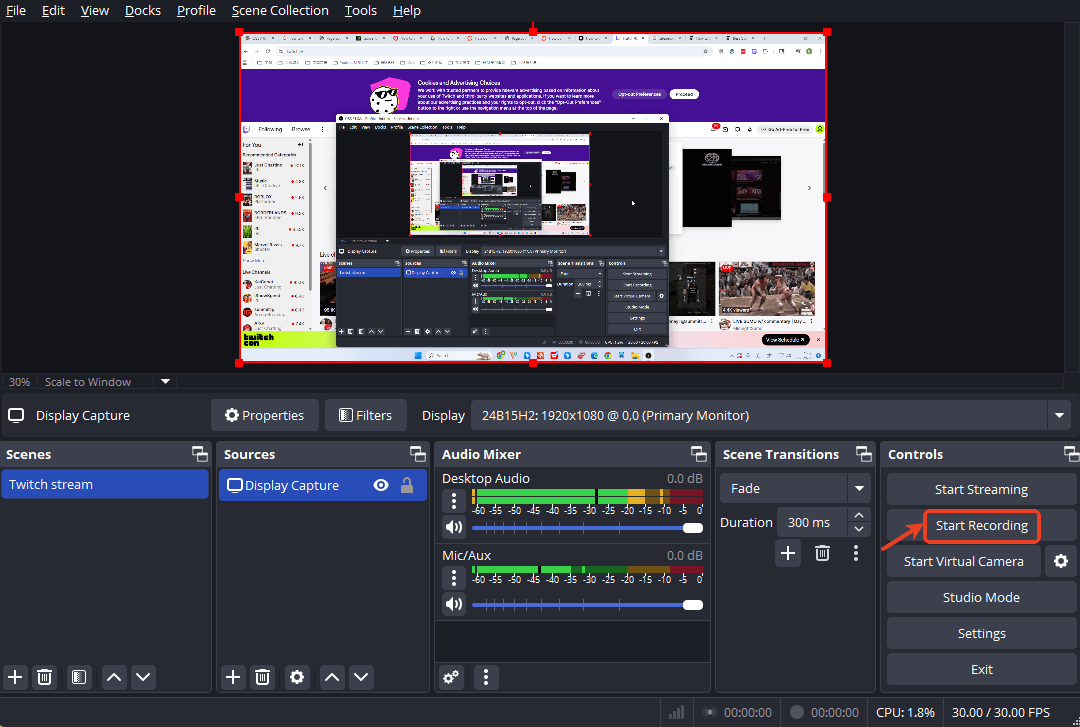
- Read also: How to Stream on Twitch with OBS: Beginner's Guide
3). Customization & Flexibility
- OBS Studio offers a high level of customization. You can fine-tune encoding settings, adjust bitrates, install plugins, and control nearly every aspect of your recording or stream. This flexibility is powerful, but it also comes with a learning curve.
- Bandicam keeps things minimal. Most settings are easy to find and require little configuration, but the trade-off is limited flexibility. You won't get the same level of control as OBS, especially for advanced setups.
4). Built-in Tools & Workflow
- Bandicam includes a few built-in tools that make quick tasks easier, such as scheduled recording, real-time drawing, and basic output options. This makes it more convenient for users who want an all-in-one solution.
- OBS Studio, by contrast, focuses entirely on capture and streaming. It doesn't include editing or extra tools, so users often rely on additional software for post-production.
Share this post if you find it helpful!
3. Performance
In short, Bandicam is the better choice for stable, low-impact recording, especially on lower-end PCs. OBS Studio can achieve excellent performance too, but only if you're willing to spend time optimizing the settings.
Performance is often the deciding factor, especially for users recording gameplay or working on low-end PCs. While both tools can deliver high-quality recordings, the difference lies in resource usage and setup complexity.
|
Gaming Performance |
Bandicam |
OBS Studio |
|
CPU & GPU Usage |
CPU stayed between 6–9% at 1080p/30fps |
CPU peaked around 20–25% with NVENC |
|
Gaming Performance |
Maintaining stable frame rates with minimal in-game impact, specifically for capturing DirectX/OpenGL games |
Depending heavily on your configuration. Poor settings can lead to dropped frames or stuttering. |
|
Low-End PC Experience |
Relatively low risk of lag or crashes |
Struggle on low-end PCs unless carefully configured with a lower bitrate, a proper encoder, and resolution scaling |
|
Reliability & Stability |
Consistent performance with minimal setup |
More control, more variables |
4. Pricing
In short: For most users, if you want zero cost and maximum flexibility, choose OBS Studio; If you prefer simplicity and don't mind paying for a smoother experience, choose Bandicam.
Pricing is one of the biggest factors in the decision, and also where the difference between Bandicam and OBS Studio is most obvious.
- OBS Studio is completely free and open-source. There are no locked features, no watermarks, and no recording limits.
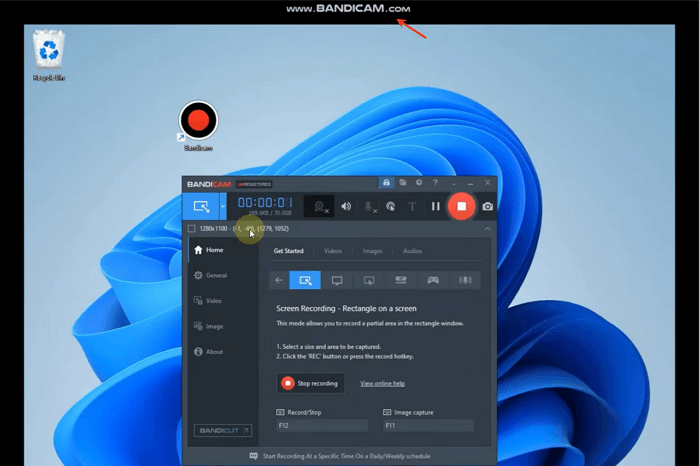
- Bandicam uses a freemium model. You can use it for free, but with limitations: a watermark on videos (invisible during recording) and a 10-minute recording limit. To remove these restrictions, like Bandicam no watermark, you need to pay for a license, typically a one-time ~$40–$50 fee or an annual plan.
5. Ease of Use
In short, Bandicam is much easier to use and better suited for beginners or anyone who values speed and simplicity. OBS Studio offers far more control, but that flexibility comes with a steeper learning curve and a higher risk of setup friction.
- Bandicam is designed for simplicity. Once you open the software, the interface is clear and focused: choose a recording mode, hit the record button, and you're good to go. Most users can start recording within minutes without reading any guides. This "record and go" experience is exactly why beginners and casual users tend to prefer it.
- OBS Studio, by contrast, requires an initial setup before you can even begin recording. You need to understand concepts like scenes, sources, and audio mixers, then configure them correctly. For first-time users, this often feels overwhelming. Many users mention that OBS is powerful, but not intuitive without watching tutorials or spending time experimenting.
6. OS Compatibility
In short, OBS Studio offers much broader OS compatibility across Windows, macOS, and Linux, making it the go-to choice for cross-platform users. Bandicam is more limited by comparison, but it works reliably across Windows, Mac, and web browsers.
- OBS Studio is fully cross-platform. It runs on Windows, macOS, and Linux, and is actively maintained across all three systems. This makes it a flexible choice for users working in different environments, especially developers, Mac creators, or anyone using Linux-based systems. One thing to note: OBS has enabled users to record internal audio on Mac in recent versions.
- Bandicam, in contrast, is primarily a Windows-focused tool. It officially supports Windows 7 through Windows 11 and has relatively low system requirements. While there are mentions of a macOS and online version or alternatives, the core product and full feature set are still centered around Windows.
7. File Format Support
In short, Bandicam supports MP4, AVI, MKV, WebM, and MP3 as its output video formats; OBS supports more input and output file formats.
- Bandicam keeps things simple by focusing on widely used formats like MP4, AVI, MKV, WebM, and MP3. These formats are compatible with most video editors and platforms, which makes exporting and sharing straightforward. It also lets you choose common codecs like H.264 or HEVC, so you can balance quality and file size with minimal effort.
- OBS Studio offers more flexibility. In addition to MP4, it supports formats like MKV and FLV, which are often preferred for longer or more complex recordings. For example, many users choose MKV in OBS because it reduces the risk of file corruption if a recording crashes—something that comes up frequently in user discussions. You can also remux recordings into MP4 afterward for easier editing. Check OBS audio/video formats guide.
Share this post if you find it helpful!
Final Verdict
OBS Studio and Bandicam are often compared because they solve the same problem in very different ways. Based on common user discussions, OBS is seen as a powerful, flexible tool built for streaming and advanced recording setups, while Bandicam is favored for its simplicity, stability, and lightweight performance for quick screen capture and gameplay recording.
Choose OBS Studio if you are:
- A streamer on Twitch or YouTube
- A content creator needing multi-source scenes (webcam, overlays, audio mixing)
- Comfortable with a steeper learning curve for more control and customization
Choose Bandicam if you are:
- A beginner who just wants a quick, easy screen recording
- A gamer on a low-to-mid range PC prioritizing performance
- Someone who prefers a simple "record and go" workflow without setup complexity
For a more balanced option, EaseUS RecExperts is a good alternative.